Online Menu Options
The Online menu in TheBrain toolbar provides access to your Cloud Services settings from your desktop client and helps you share thoughts and brains
quickly.
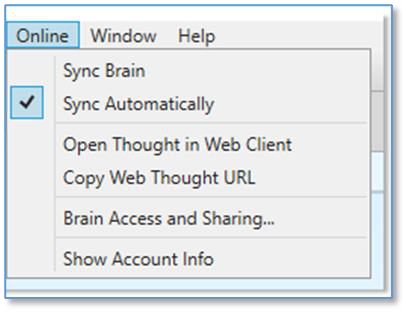
Figure 298. Online Menu Options
Click the Online menuin TheBrain’s toolbar to access the following features:
Sync Brain—Synchronizes the current opened brain to your Cloud account.
Sync Automatically—Toggle on or off automatic synchronization, once your
brain is already synchronized to your Cloud account.
Open Thought in Web Client—Launches a Browser window and automatically loads the current brain/thought from TheBrain Cloud.
Copy Web Thought URL—Copies the current active thought’s online URL to your system clipboard. This saves you the hassle of launching a new browser window to log into your Brain Cloud account and navigating to a specific thought
in order to acquire its URL.

Copy Web Thought URL
and
View in Browser
will only work if you have synchronized your brain to TheBrain Cloud.
Brain Access and Sharing—This is a quick way to switch a brain’s Access Control Level (public or private), copy the brain’s online URL or grant a new TeamBrain member access. You may also type in an email address to share a
read-only copy of your brain with someone else.
Show Account Info—Easy access to managing your external accounts and logging out of TheBrain Cloud.